A throwing disc game about finding the angle
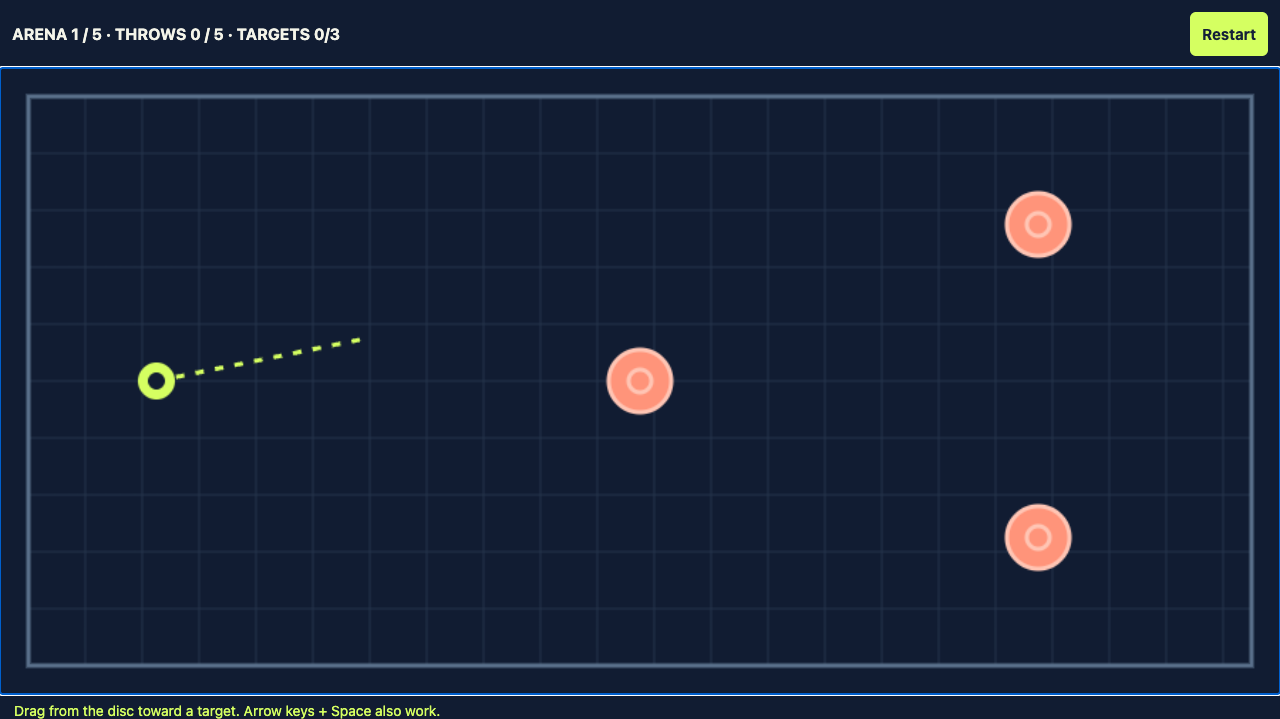
Throwing Disc is an original browser puzzle game in a rectangular ricochet arena. You launch one glowing disc, bounce it off the walls and try to hit every coral target before your five throws run out. The disc travels for three seconds on each throw, then returns to its starting position. Targets you have already hit stay cleared for the rest of that attempt.
The challenge is to plan a route rather than chase a moving enemy. There is no countdown while you aim. Take a moment, look at the targets and choose a direction that makes the most of the arena boundaries. A successful throw can hit several targets on its outward journey and after a wall bounce. Clear all targets to unlock the next arena.
How to play Throwing Disc
Mouse and touch controls
Press inside the arena and drag toward the direction you want the disc to travel. A dotted aiming line shows your intended direction. Release the mouse button or lift your finger to launch. The launch direction runs from the disc to your release point; this is direct aiming rather than a pull-back slingshot. Drag farther away when you want to set a small angle more precisely.
On a phone, the arena scales to the screen width. The play area captures your touch while you are aiming so that a shot does not accidentally scroll the page. You can scroll normally outside the arena. Use the fullscreen button next to the game when you want a larger view.
Keyboard controls
Click or tap the arena to give it focus. Use the arrow keys to rotate the aim, then press Space to throw. Left and Up turn the aim one way; Right and Down turn it the other way. The aiming line appears when you adjust the direction. Restart and Next arena are normal buttons that you can also reach with Tab.
Winning and restarting
Each arena allows five throws. All targets must be hit during that attempt. The counter above the arena shows your current arena, throws used and targets cleared. When every target is cleared, the Next arena button appears. If you use all five throws without clearing every target, press Restart to reset that arena. Restart clears its targets and throw counter, so use it when you want to rethink a route from the beginning.
Play Throwing Disc with no download
Nothing to install: Throwing Disc runs inside this browser tab. There is no download, no app store, no plugin and no account to create. Press Play once and the arena loads in place on this page, in the game area above.
After you press Play, the embedded arena loads its game code. Aiming, wall reflections and target layouts run in the browser. Closing the tab ends your game session. There is no app to uninstall; your browser may retain ordinary cache or cookies.
Five arenas, one returning disc
Throwing Disc includes five fixed target arrangements. The opening arena has three targets; later arrangements spread more targets across the upper, lower and far sides of the playfield. You do not have to finish all five in one perfect streak. Each arena is its own challenge, and its throw allowance starts fresh when you move on.
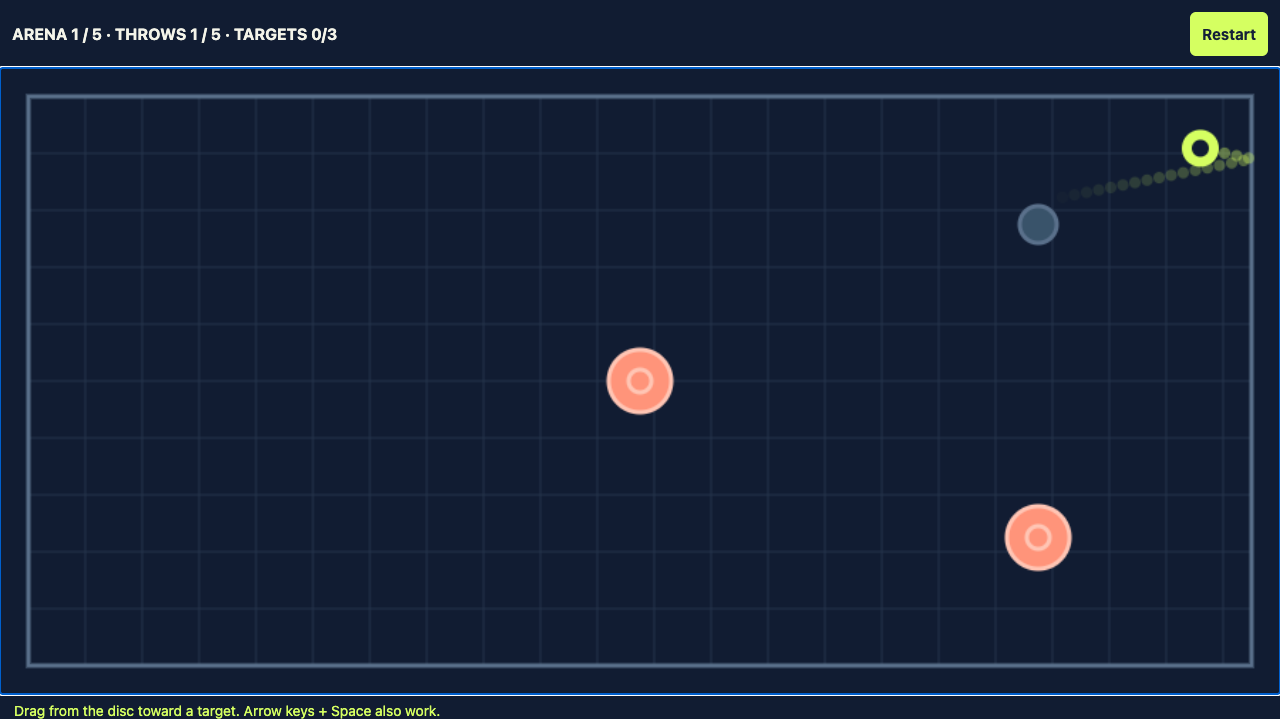
The disc always starts on the left side of the arena. Its speed is fixed, so aim changes the route rather than launch strength. Walls reflect its horizontal or vertical movement. A disc travelling diagonally toward the upper wall continues diagonally downward after the bounce. A hit turns a coral target into a muted marker, letting you see which targets remain.
The disc returns to its starting position after about three seconds — you do not catch it, and there is no combo multiplier, score chain or catch bonus. Clearing a target is permanent for the rest of that attempt. The five arenas contain fixed targets and walls, with no moving opponents or internal obstacles.
Throwing Disc game specifications
| Specification | This site's original game |
|---|---|
| Arenas | 5 |
| Targets per arena | 3 / 4 / 5 / 5 / 6, in order |
| Throws per arena | 5 per attempt; Restart resets the allowance |
| Disc speed | Constant; no gravity or gradual slowdown |
| Wall bounce | Angle in equals angle out, measured from the wall normal |
| Return to start | After about 3 seconds of simulated flight; clearing the arena can end it earlier |
| Catching, combos and lives | No manual catching, no combo scoring and no lives or hearts |
| Access and purchases | No game account, no app download or installation, and no in-game purchases; the website may show ads |
Is this the Minecraft throwing disc?
No. The game on this page is an independent browser puzzle game. Minecraft’s throwing disc is a separate weapon announced for Minecraft; consult Minecraft’s official announcements for its release and availability. This page is not Minecraft, not a Minecraft mod, not a weapon showcase, and it is not affiliated with Mojang or Microsoft.
| Minecraft throwing disc | Throwing Disc on this page | |
|---|---|---|
| Where you play it | A feature announced for Minecraft; availability depends on its release | In a browser tab, with nothing installed |
| What you throw at | Mobs and other players in that world | Coral targets fixed around a walled arena |
| How a throw works | A returning weapon described in Minecraft’s announcement | It bounces off walls for three seconds, clearing every target it touches |
This page also does not sell physical flying discs, disc-golf equipment or toys.
If you arrived here looking for the Minecraft weapon, this page will not match what you saw. If you want a short aiming puzzle you can play in a browser tab right now, press Play above.
Battle Disc, Disc Challenge, Ultimate Disc, Mr Disc and Throw Disc are separate browser games with similar names or themes. This site's original Throwing Disc is not any of those games and is not affiliated with their publishers. Their catching, lives, scoring and movement rules do not describe the game here.
Is this a phone app? No.
The original Throwing Disc at thethrowingdisc.com is a browser game. We do not publish an App Store or Google Play version of this game. There is no app to install, update through an app store or reinstall.
| Name or version | Where it runs | What this means for you |
|---|---|---|
| Throwing Disc on thethrowingdisc.com | Directly in your browser | All five arenas are free; no in-app purchases, subscription or paid ad-removal option |
| Throw Disc mobile apps | Separate store listings from other publishers | They are not this site's game; their prices and purchases do not apply here |
| Battle Disc mobile apps | Separate store listings from other publishers | They are not this site's game; their app updates and purchases are unrelated to this site |
The website may display advertising, but we do not sell an ad-free upgrade or ask for payment details to play. A price or purchase mentioned in an app-store listing is not a charge for this browser game.
If this game will not open on your phone, reload this website and use the browser troubleshooting below. Do not look for an app-store update or reinstall a similarly named app to fix this site.
Throwing Disc tips for better routes
How the disc bounces
- The speed is fixed at 520 arena units per second. Aiming changes direction, not power.
- There is no gravity or gradual slowdown: the disc travels in straight segments between wall contacts.
- A wall reverses the movement component perpendicular to it, reflecting the angle. A single throw can bounce several times.
- After about three seconds of simulated flight, the disc returns to its starting position. Wait for its return before throwing again, unless you have already cleared the arena.
- Each arena allows five throws per attempt. Cleared targets stay cleared until you restart that arena.
The dotted aiming line shows only the initial direction. It does not predict the complete reflected path. These rules describe this site's game implementation, not every game called Throwing Disc.
Three practical aiming tips
- Study which targets can share a reflected path before releasing.
- Use a long aiming drag for fine angle adjustments; watch the flight before deciding your next shot.
- Target the remaining coral markers rather than repeating a route through already-cleared targets.
See the full walkthrough for all five arenas, including tested directions, target layouts and fallback shots.
If Throwing Disc is not loading (desktop or phone)
On a computer, use a current Chrome, Edge, Firefox or Safari browser with JavaScript and canvas enabled. Try a hard refresh (Ctrl+Shift+R on Windows or Cmd+Shift+R on Mac), or another browser. If a content blocker prevents the arena from loading, temporarily allow this site and reload, then restore your preferred settings. These are troubleshooting steps, not confirmation that your device or the website is at fault.
On a phone, open the page directly in Safari on iPhone or Chrome on Android, check the connection and try the symptoms below.
The arena stays black after you press Play
Desktop: allow the initial load to finish, then hard-refresh if it stays black. Try another browser; if you are comfortable with developer tools, check the console for a blocked script or failed request. Phone: exit fullscreen, reload and try a different network. On either device, a content blocker may require a temporary site exception.
The loading message never finishes
Desktop: check the connection, hard-refresh and try a private window or another browser to isolate cached data and extensions. Phone: switch between Wi-Fi and mobile data, exit fullscreen, reload and press Play again. If the problem continues, report the device, browser and error message through the contact page.
Dragging scrolls the page instead of aiming
Your finger has to start inside the dark arena. A drag that begins outside it scrolls the page, which is how the rest of this page is meant to work. Turn the phone sideways or use fullscreen to make the arena bigger and easier to hit.
The screen goes black in fullscreen
Leave fullscreen with the browser back gesture or the Esc key and play in the normal view. Rotating the phone after leaving fullscreen makes the arena fit the new width again.
Nothing happens when you press Play
JavaScript has to be enabled in the browser for the arena to start. Open this page in a current version of Safari on iPhone or Chrome on Android; older built-in browsers on some phones cannot run the canvas arena.
More aiming and ricochet games
Ricochet Rescue uses wall-bank shots and additional puzzle objects; our disc arena has no internal obstacles. Paper Toss uses wind and variable throwing power; our disc speed is fixed. Mirror Shot also appears in player recommendations for reflection puzzles, but we have not verified the game behind that listing, so its rules should not be assumed to match ours.
Read our games like Throwing Disc comparison for the source pages, twelve named alternatives and their differences.
Throwing Disc questions
Is Throwing Disc free to play?
Yes. All five arenas are free, with no in-game purchases, paid arenas or payment details required. The website has Google AdSense code and may display advertising; the original disc arena contains no built-in ad placements.
Do I need an account to play Throwing Disc?
No. There is no registration, login or game account system. Progress stays in the current session and resets when you reload. This game has no account-based leaderboard.
Do I need to download or install Throwing Disc?
No. Throwing Disc runs inside the browser tab. There is nothing to download, no app store, no plugin and no account. Press Play and the arena loads in place on this page.
Can I play Throwing Disc on a phone or tablet?
Yes. It works in Safari on iPhone and iPad and in Chrome on Android, as long as JavaScript and canvas are enabled. Touch the dark arena, drag to aim, then lift your finger to throw. Turning the phone sideways gives the widest view.
Does Throwing Disc save my progress?
No. Arena progress belongs to the current game session. Reloading the page starts a fresh session, and there is no saved campaign, public leaderboard or account system.
How long does it take to finish Throwing Disc?
There are five arenas, with up to five throws per attempt at each arena. A run without restarts uses at most 25 throws; retries can add more. There is no time limit for aiming.
Can I play Throwing Disc in fullscreen?
Use the fullscreen button next to the arena when your browser supports fullscreen. Mobile fullscreen and orientation support varies by browser. Exit with Esc on a keyboard or your device’s fullscreen controls.
Why has my disc stopped launching?
Only one throw can be active at a time, so wait for the disc to return. If the throw counter has reached five, restart the arena. If every target is cleared, choose Next arena instead.
Why is the game not working on my phone?
Check that JavaScript is on and that no ad blocker or tracking blocker is stopping the embedded arena, then reload the page and press Play again. Touch only counts inside the dark arena, so aim within the playfield. If fullscreen goes black, leave fullscreen and play in the normal view.
Is Throwing Disc an app?
No. The original game at thethrowingdisc.com runs in your browser and has no App Store or Google Play version to install, update or reinstall.
Does Throwing Disc charge anything, including an ad-free purchase?
No. All five arenas are free, with no subscription, in-game purchase or paid ad-free upgrade; the website may display ads.
Does Throwing Disc have obstacles, hearts or a catch mechanic?
No. Targets are fixed with no internal obstacles, hearts, lives or combo scoring, and the disc automatically returns after about three seconds of simulated flight unless the arena clears earlier.
How many throws do I get per arena?
You get five throws per arena attempt; Restart resets that arena's targets and restores its five-throw allowance.
 Bubble Shooter
 Breakout